วันจันทร์ที่ 18 พฤษภาคม พ.ศ. 2563
PHP เพิ่ม - ลด - วันเวลา
<?php
function thaiLdate($vardate="") {
$_month_name = array("01"=>"มกราคม", "02"=>"กุมภาพันธ์", "03"=>"มีนาคม","04"=>"เมษายน", "05"=>"พฤษภาคม", "06"=>"มิถุนายน", "07"=>"กรกฎาคม", "08"=>"สิงหาคม", "09"=>"กันยายน", "10"=>"ตุลาคม", "11"=>"พฤศจิกายน", "12"=>"ธันวาคม");
$yy =substr($vardate,0,4);$mm =substr($vardate,5,2);$dd =substr($vardate,8,2);
$yy += 543;
if ($yy==543){
$dateT = "-";
}else{
$dateT=$dd ." ".$_month_name[$mm]." ".$yy;
}
return $dateT;
}
echo thaiLdate(Date("Y-m-d", strtotime("$theData[6] - 1 DAY"))) // ลด 1 วัน , Month, Year
?>

วันศุกร์ที่ 26 เมษายน พ.ศ. 2562
PHP สร้าง Text File // อ่าน Text File
การสร้าง Text File
<?php
$myfile = fopen("sk_fore.txt", "w") or die("Unable to open file!");
$txt = number_format($row_rs_eff2for[forebay],2);
fwrite($myfile, $txt);
$txt = "|".$row_rs_eff2for[eff_storage];
fwrite($myfile, $txt);
$txt = "|".$row_rs_eff2for_ncc[forebay];
fwrite($myfile, $txt);
$txt = "|".$row_rs_eff2for_ncc[eff_storage];
fwrite($myfile, $txt);
fclose($myfile);
?>
การอ่าน Text File
<?php
$myFile = "../../sk/sk_fore.txt";
$fh = fopen($myFile, 'r');
$theData = explode("|",fread($fh, filesize($myFile)));
fclose($fh);
?>
นำไปแสดงผล
<tr>
<td colspan="3" rowspan="3" background="images/sk_graphic4_65.gif"><input name="textfield" type="text" class="style11" value="<?=number_format($theData[1],2);?>" size="8" maxlength="10"> </td>
<?php
$myfile = fopen("sk_fore.txt", "w") or die("Unable to open file!");
$txt = number_format($row_rs_eff2for[forebay],2);
fwrite($myfile, $txt);
$txt = "|".$row_rs_eff2for[eff_storage];
fwrite($myfile, $txt);
$txt = "|".$row_rs_eff2for_ncc[forebay];
fwrite($myfile, $txt);
$txt = "|".$row_rs_eff2for_ncc[eff_storage];
fwrite($myfile, $txt);
fclose($myfile);
?>
การอ่าน Text File
<?php
$myFile = "../../sk/sk_fore.txt";
$fh = fopen($myFile, 'r');
$theData = explode("|",fread($fh, filesize($myFile)));
fclose($fh);
?>
นำไปแสดงผล
<tr>
<td colspan="3" rowspan="3" background="images/sk_graphic4_65.gif"><input name="textfield" type="text" class="style11" value="<?=number_format($theData[1],2);?>" size="8" maxlength="10"> </td>
PHP การบวกเพิ่มค่าแบบทวีคูณ โดย Dreamweaver
mysql_select_db($database_sk50, $sk50);
$query_rs_inf_rel = "SELECT plan_ncc_data.mydate as r_date, plan_ncc_data.inflow_ncc as inflow_ncc, plan_ncc_data.release_ncc as release24, plan_ncc_data.inflow_61 as inflow24 FROM xxxxx WHERE plan_ncc_data.mydate BETWEEN '$input1' AND '$input2'";
$rs_inf_rel = mysql_query($query_rs_inf_rel, $sk50) or die(mysql_error());
$row_rs_inf_rel = mysql_fetch_assoc($rs_inf_rel);
$totalRows_rs_inf_rel = mysql_num_rows($rs_inf_rel);
$sumdiff= $row_show_eff['eff_now'];
do {
$wdiff = $row_rs_inf_rel['inflow24'] - $row_rs_inf_rel['release24'];
$wdiff_ncc = $row_rs_inf_rel['inflow_ncc'] - $row_rs_inf_rel['release24'];
$sumdiff =$sumdiff +$wdiff ; //บวกเพิ่มค่าตัวที่ 1
$sumdiff1 =$sumdiff +$wdiff_ncc ; //บวกเพิ่มค่าตัวที่ 2
// กำหนดเก็บข้อมูลในรูปแบบ array
$mydt[] = $row_rs_inf_rel['r_date'];
$inflow_24[] = $row_rs_inf_rel['inflow24'];
$release_24[] = $row_rs_inf_rel['release24'];
$inflow_ncc[] = $row_rs_inf_rel['inflow_ncc'];
$wdiff_24[]=$wdiff;
$wdiff_ncc1[]=$wdiff_ncc;
$sumdiff_24[] = $sumdiff;
$sumdiff_ncc[] = $sumdiff1;
} while ($row_rs_inf_rel = mysql_fetch_assoc($rs_inf_rel));
วันจันทร์ที่ 11 กุมภาพันธ์ พ.ศ. 2562
Python การ Plot กราฟ แบบต่าง ๆ
import pandas as pd
import numpy as np
import matplotlib.pyplot as plt
df = pd.read_csv('titanic_data.csv')
#ตรวจสอบค่า na
df_pre.isnull().sum()
#ลบค่า na
df_pre.dropna(inplace=True)
df_pre.isnull().sum()
#ลบ Column
del df_pre['Cabin']
#การเตรียมข้อมูล กำหนดค่า na ให้มีค่า ของ Feild 'Age' ด้วย Mean
# โดยเงื่อนไขว่าให้หาค่าเฉลี่ยอายุของแต่ละ Class แล้วเติมค่าใน na
mean1 = df_pre[df_pre['Pclass'] == 1]['Age'].mean()
df_pre.loc[df_pre['Pclass'] ==1,'Age'] = df_pre[df_pre['Pclass'] == 1]['Age'].fillna(mean1)
mean2 = df_pre[df_pre['Pclass'] ==2]['Age'].mean()
df_pre.loc[df_pre['Pclass'] ==2,'Age'] = df_pre[df_pre['Pclass'] ==2]['Age'].fillna(mean2)
mean3 = df_pre[df_pre['Pclass'] ==3]['Age'].mean()
df_pre.loc[df_pre['Pclass'] ==3,'Age'] = df_pre[df_pre['Pclass'] ==3]['Age'].fillna(mean3)
df_pre['Age'].isnull().value_counts()
#Plot โดยใช้ hist //bins คือจำนวนแกน
plt.hist(df_pre['Age'],bins=5)

# กำหนดขนาดของกราฟ
from matplotlib import rcParams
rcParams['figure.figsize'] = 11.7,8.27 # figure size in inches
# การใช้ seaborn
sns.distplot(df_pre['Age'], bins = 10)
 sns.distplot(df_pre['Age'], hist=False)
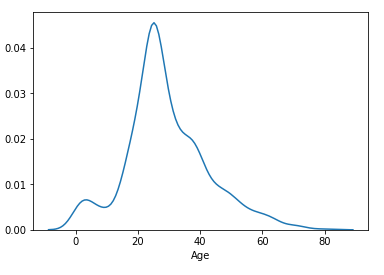 sns.distplot(df_pre['Age'], hist=False, color='red')

sns.boxenplot(df_pre['Age'])
 sns.boxenplot(df_pre['Sex'],df_pre['Age'])

sns.boxenplot(df_pre['Pclass'],df_pre['Age'])
 sns.violinplot(df_pre['Age'])

sns.violinplot(df_pre[df_pre['Pclass']==1]['Age'], df_pre['Sex'])

sns.kdeplot(df_pre['Age'], cumulative=True)
 sns.pairplot(df_pre)
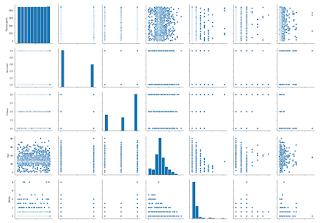
sns.pairplot(df_pre, kind='reg')

sns.jointplot(x='Age', y='Survived', data=df_pre, kind='reg')
 sns.catplot(x='Pclass', y='Survived', data=df_pre, kind='violin', height=10)
 sns.catplot(x='Pclass', y='Fare', hue ='Survived', data=df_pre, kind='violin', height=10)
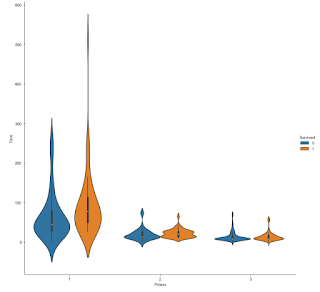 sns.catplot(x='Pclass', y='Fare', hue ='Sex_num', col='Survived', data=df_pre, kind='bar', height=10)
 sns.catplot(x='Pclass', y='Fare', hue='Embarked_num', col = 'Sex', data=df_pre, kind='violin', height=10)
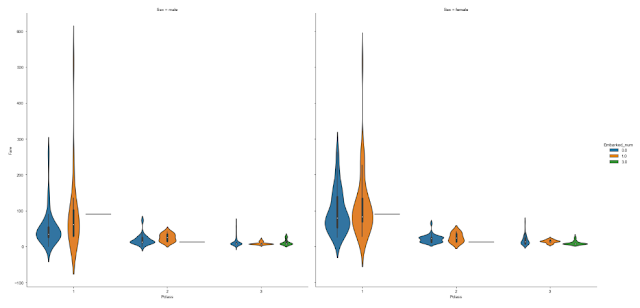
sns.catplot(x='Pclass', y='Fare', hue='Embarked_num', col = 'Sex', data=df_pre, kind='bar', height=10)
 df_pre.loc[(df_pre['Embarked']=='Q') & (df_pre['Pclass']==1)]

import numpy as np
import matplotlib.pyplot as plt
df = pd.read_csv('titanic_data.csv')
#ตรวจสอบค่า na
df_pre.isnull().sum()
#ลบค่า na
df_pre.dropna(inplace=True)
df_pre.isnull().sum()
#ลบ Column
del df_pre['Cabin']
#การเตรียมข้อมูล กำหนดค่า na ให้มีค่า ของ Feild 'Age' ด้วย Mean
# โดยเงื่อนไขว่าให้หาค่าเฉลี่ยอายุของแต่ละ Class แล้วเติมค่าใน na
mean1 = df_pre[df_pre['Pclass'] == 1]['Age'].mean()
df_pre.loc[df_pre['Pclass'] ==1,'Age'] = df_pre[df_pre['Pclass'] == 1]['Age'].fillna(mean1)
mean2 = df_pre[df_pre['Pclass'] ==2]['Age'].mean()
df_pre.loc[df_pre['Pclass'] ==2,'Age'] = df_pre[df_pre['Pclass'] ==2]['Age'].fillna(mean2)
mean3 = df_pre[df_pre['Pclass'] ==3]['Age'].mean()
df_pre.loc[df_pre['Pclass'] ==3,'Age'] = df_pre[df_pre['Pclass'] ==3]['Age'].fillna(mean3)
df_pre['Age'].isnull().value_counts()
#Plot โดยใช้ hist //bins คือจำนวนแกน
plt.hist(df_pre['Age'],bins=5)

# การใช้ seaborn
import seaborn as sns# กำหนดขนาดของกราฟ
from matplotlib import rcParams
rcParams['figure.figsize'] = 11.7,8.27 # figure size in inches
# การใช้ seaborn
sns.distplot(df_pre['Age'], bins = 10)

sns.boxenplot(df_pre['Age'])


sns.boxenplot(df_pre['Pclass'],df_pre['Age'])


sns.violinplot(df_pre[df_pre['Pclass']==1]['Age'], df_pre['Sex'])

sns.kdeplot(df_pre['Age'], cumulative=True)


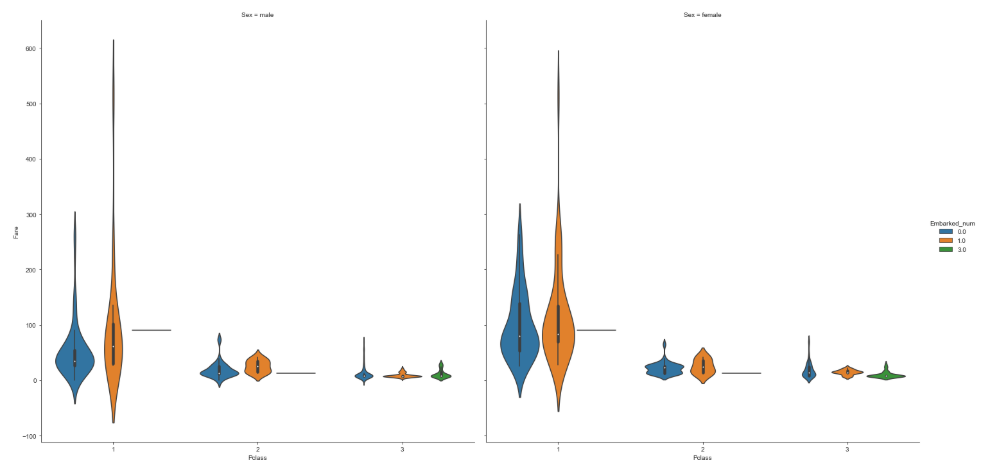
sns.catplot(x='Pclass', y='Fare', hue='Embarked_num', col = 'Sex', data=df_pre, kind='bar', height=10)


Python การจัดการ Data ด้วย Insert & Delete & Mean() & Median()
Python 3 for Data Analysis
- Insert, Delete Data
- Mean จะเหมือนกับการใช้ Average
- Median จะเป็นการเอาค่ากลางของข้อมูลมาใช้งาน
# Import Module ที่จะใช้งาน
import pandas as pd
import numpy as np
import matplotlib.pyplot as plt
df = pd.read_csv('titanic_data.csv')
# สำรอง Data Frame
df_copy = df.copy()
#แสดงด้านท้ายขึ้นมา
df_copy.tail()
#เพิ่มข้อมูล insert Data df_copy.shape[0] = จำนวน Index สุดท้าย
df_copy.loc[df_copy.shape[0]] = [892,1,3,'AAA','male',20,0,0,'AF051B7',8,'C191','S']
#ลบข้อมูล inplace=True สั่งให้คำสั่ง Update
df_copy.drop(df_copy.iloc[[892]].index)
#กรณีลบ Record สุดท้าย df_copy.shape[0]-1
df_copy.drop(df_copy.iloc[[df_copy.shape[0]-1]].index, inplace=True)
#สั่งให้คำสั่ง Drop Active
df_copy.drop(df_copy.iloc[[df_copy.shape[0]-1]].index, inplace=True)
#กรณีเพิ่ม Column เพิ่ม Column Ging โดยให้ใส่ค่า Random เข้าไป np.random.randn(df_copy.shape[0])
df_copy['ging'] = pd.Series(np.random.randn(df_copy.shape[0]))
df_copy.head()
# Delete Column
del df_copy['ging']
#check Null Data
df_drop = df.copy() #copy new data frame = df_drop
df_drop.isnull().sum() #check null data

# ลบค่า Null ออกจากข้อมูล ลบออกจาก field Embarked
df_drop.dropna(subset=['Embarked'], inplace =True)
df_drop.shape
#check Null ของ Pclass = 1 และ Age = null
df_copy =df.copy()
df_copy[df_copy['Pclass'] == 1]['Age'].isnull().value_counts()

#ตรวจสอบค่า Mean
mean1 = df_copy[df_copy['Pclass'] == 1]['Age'].mean()
mean1

#แทนค่า null ด้วยค่า Mean Pclass = 1 และ Age = ค่า 38.23
df_copy.loc[df_copy['Pclass'] ==1, 'Age'] = df_copy[df_copy['Pclass'] == 1]['Age'].fillna(mean1)
df_copy['Age'].value_counts()

#คำถาม จงเติม null (na) อายุของผู้หญิงคลาส 3 ด้วยค่า Median
#กำหนดตัวแปล median_f_3 ให้มีค่าเป็น Median =[21.5]
median_f_3 = df_copy[(df_copy['Pclass'] == 3) & (df_copy['Sex'] == 'female')]['Age'].median()
median_f_3
# เพิ่มค่า null โดยค่า Median
# loc = Filter เฉพาะคอลัมน์ที่มีค่าตามที่เราต้องการ, iloc Filter แบบ Index
df_copy.loc[(df_copy['Pclass'] == 3) & (df_copy['Sex'] == 'female'),'Age'] = df_copy[(df_copy['Pclass'] == 3) & (df_copy['Sex'] == 'female')]['Age'].fillna(median_f_3)
#แสดงค่า valud_counts()
df_copy[(df_copy['Pclass'] == 3) & (df_copy['Sex'] == 'female')]['Age'].value_counts()

#การ Convert ค่า String --> Int
#แปลงจาก Sex = male ให้ไปสร้าง Column ใหม่ชื่อว่า Sex_num โดยกำหนด ชายให้ =1, หญิง=0
df_pre.loc[(df_pre['Sex']=='male'), 'Sex_num'] = 1
df_pre.loc[(df_pre['Sex']=='female'), 'Sex_num'] = 0
#แสดงข้อมูล
df_pre.head()

วันเสาร์ที่ 3 พฤศจิกายน พ.ศ. 2561
Dreamwever Connect Mysqli
<file connect.php----------------->
<?php
// CONNECT TO THE DATABASE
$hostname_conn_Mysqli = 'localhost';
$username_conn_Mysqli = 'root';
$password_conn_Mysqli = 'xxxxx';
$database_conn_Mysqli = 'xxxxx';
$mysqli = new mysqli($hostname_conn_Mysqli, $username_conn_Mysqli, $password_conn_Mysqli, $database_conn_Mysqli);
mysqli_set_charset($mysqli,"utf8");
if (mysqli_connect_errno()) {
printf("Connect failed: %s\n", mysqli_connect_error());
exit();
}
function return_rows($db,$query) {
$res = $db->query($query) or die($db->error.__LINE__);
if($res->num_rows > 0) {
return $res;
}
}
?>
<ใน Dreamweaver------------------>
<?php require_once('Connections/conn_Mysqli.php'); ?>
<?php
$com = "SELECT * FROM xxxx";
$rs_mysqli = return_rows($mysqli,$com);
?>
<!DOCTYPE html PUBLIC "-//W3C//DTD XHTML 1.0 Transitional//EN" "http://www.w3.org/TR/xhtml1/DTD/xhtml1-transitional.dtd">
<html xmlns="http://www.w3.org/1999/xhtml">
<head>
<meta http-equiv="Content-Type" content="text/html; charset=utf-8" />
<title>Mysqli data show</title>
</head>
<body>
<?php
if($rs_mysqli->num_rows > 0) { ?> //ตรวจสอบข้อมูลว่ามากกว่า 0
<table border="1" align="center">
<tr>
<td><div align="center"><strong>r_date</strong></div></td>
<td><div align="center"><strong>fore24</strong></div></td>
<td><div align="center"><strong>tail24</strong></div></td>
</tr>
<?php
while($row_rs_mysqli = $rs_mysqli->fetch_assoc()) { ?> //วน Loop ดึงข้อมูลมาแสดง
<tr>
<td><?php echo $row_rs_mysqli['r_date']; ?></td>
<td><?php echo $row_rs_mysqli['fore24']; ?></td>
<td><?php echo $row_rs_mysqli['tail24']; ?></td>
</tr>
<?php }
$totalRows_rs_mysqli = mysqli_num_rows($rs_mysqli); //นับจำนวน Record ทั้งหมด
} else {
echo "<h1><center>file not found </center></h1>";
}
echo $totalRows_rs_mysqli; //แสดงจำนวน Record
?>
</table>
</body>
</html>
<?php
mysqli_close($mysqli); //ปิด Connection
?>
<?php
// CONNECT TO THE DATABASE
$hostname_conn_Mysqli = 'localhost';
$username_conn_Mysqli = 'root';
$password_conn_Mysqli = 'xxxxx';
$database_conn_Mysqli = 'xxxxx';
$mysqli = new mysqli($hostname_conn_Mysqli, $username_conn_Mysqli, $password_conn_Mysqli, $database_conn_Mysqli);
mysqli_set_charset($mysqli,"utf8");
if (mysqli_connect_errno()) {
printf("Connect failed: %s\n", mysqli_connect_error());
exit();
}
function return_rows($db,$query) {
$res = $db->query($query) or die($db->error.__LINE__);
if($res->num_rows > 0) {
return $res;
}
}
?>
<ใน Dreamweaver------------------>
<?php require_once('Connections/conn_Mysqli.php'); ?>
<?php
$com = "SELECT * FROM xxxx";
$rs_mysqli = return_rows($mysqli,$com);
?>
<!DOCTYPE html PUBLIC "-//W3C//DTD XHTML 1.0 Transitional//EN" "http://www.w3.org/TR/xhtml1/DTD/xhtml1-transitional.dtd">
<html xmlns="http://www.w3.org/1999/xhtml">
<head>
<meta http-equiv="Content-Type" content="text/html; charset=utf-8" />
<title>Mysqli data show</title>
</head>
<body>
<?php
if($rs_mysqli->num_rows > 0) { ?> //ตรวจสอบข้อมูลว่ามากกว่า 0
<table border="1" align="center">
<tr>
<td><div align="center"><strong>r_date</strong></div></td>
<td><div align="center"><strong>fore24</strong></div></td>
<td><div align="center"><strong>tail24</strong></div></td>
</tr>
<?php
while($row_rs_mysqli = $rs_mysqli->fetch_assoc()) { ?> //วน Loop ดึงข้อมูลมาแสดง
<tr>
<td><?php echo $row_rs_mysqli['r_date']; ?></td>
<td><?php echo $row_rs_mysqli['fore24']; ?></td>
<td><?php echo $row_rs_mysqli['tail24']; ?></td>
</tr>
<?php }
$totalRows_rs_mysqli = mysqli_num_rows($rs_mysqli); //นับจำนวน Record ทั้งหมด
} else {
echo "<h1><center>file not found </center></h1>";
}
echo $totalRows_rs_mysqli; //แสดงจำนวน Record
?>
</table>
</body>
</html>
<?php
mysqli_close($mysqli); //ปิด Connection
?>
วันเสาร์ที่ 28 กรกฎาคม พ.ศ. 2561
เขียน PHP ตรวจสอบขนาดหน้าจอเพื่อ ตั้งค่า Height ของ IFRAME
เขียน PHP ตรวจสอบขนาดหน้าจอเพื่อ ตั้งค่า Height ของ IFRAME ให้ดูสวยงาม
if(!isset($_GET['screen_check']))
{
/* This code will be executed if screen resolution has not been detected.*/
echo "<script language='JavaScript'>
<!--
document.location=\"$PHP_SELF?screen_check=done&Width=\"+screen.width+\"&Height=\"+screen.height;
//-->
</script>";
}
if(!isset($_GET['screen_check']))
{
/* This code will be executed if screen resolution has not been detected.*/
echo "<script language='JavaScript'>
<!--
document.location=\"$PHP_SELF?screen_check=done&Width=\"+screen.width+\"&Height=\"+screen.height;
//-->
</script>";
}
ส่วนของ Iframe // ขนาดหน้าจอ 1920*1080 ค่าที่เหมาะสม ให้ลบดู (-270)
<iframe src="show1.php" width="100%" height="<?=$_GET['Height']-270;?>" id = "myiframe" name="myiframe" marginwidth="5" marginheight="5" frameborder="2" id="myiframe" >
</iframe>
สมัครสมาชิก:
บทความ (Atom)